mirror of
https://github.com/Nereziel/cs2-WeaponPaints.git
synced 2026-05-20 14:11:56 +00:00

cs2-WeaponPaints
Description
Unfinished, unoptimized and not fully functional ugly demo weapon paints plugin for CSSharp. There will be a lot of frequent changes which may break functionality or compatibility. You have been warned!
Created Discord server where you can discus about plugin.
Consider to donate instead of buying from unknown sources.

Features
- changes only paint, seed and wear on weapons and knives
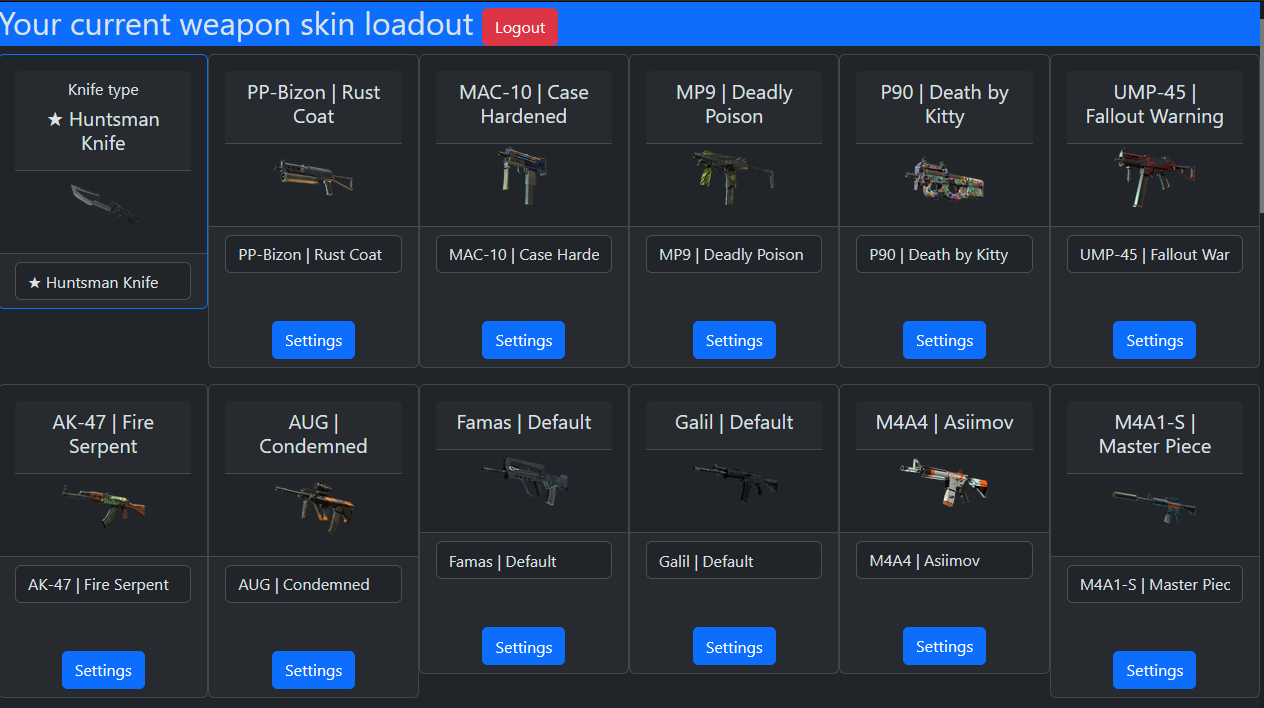
- mysql based or global website at weaponpaints.fun, so you dont need mysql/website
- data sync on player connect
- Added command
!wpto refresh skins (with cooldown in second can be configured) - Added command
!wsto show website - Added command
!knifeto show menu with knives - Knife change is now limited to have these cvars empty
mp_t_default_melee ""andmp_ct_default_melee ""
CS2 server:
- compile and copy plugin to plugins. Info here https://docs.cssharp.dev/guides/hello-world-plugin/
- setup
addons/counterstrikesharp/configs/plugins/WeaponPaints/WeaponPaints.jsonsetGlobalShareto true for global, or include database credentials - in
addons/counterstrikesharp/configs/core.jsonset FollowCS2ServerGuidelines to false
Plugin configuration:
Spoiler warning
{
	"Version": 4, // Don't touch
	"DatabaseHost": "", // MySQL host (required if GlobalShare = false)
	"DatabasePort": 3306, // MySQL port (required if GlobalShare = false)
	"DatabaseUser": "", // MySQL username (required if GlobalShare = false)
	"DatabasePassword": "", // MySQL user password (required if GlobalShare = false)
	"DatabaseName": "", // MySQL database name (required if GlobalShare = false)
	"GlobalShare": false, // Enable or disable GlobalShare, plugin can work without mysql credentials but with shared website at weaponpaints.fun
	"CmdRefreshCooldownSeconds": 60, // Cooldown time in refreshing skins (!wp command)
	"Prefix": "[WeaponPaints]", // Prefix every chat message
	"Website": "example.com/skins", // Website used in WebsiteMessageCommand (!ws command)
"Messages": {
	"WebsiteMessageCommand": "Visit {WEBSITE} where you can change skins.", // Information about website where player can change skins (!ws command) Set to empty to disable
	"SynchronizeMessageCommand": "Type !wp to synchronize chosen skins.", // Information about skins refreshing (!ws command) Set to empty to disable
	"KnifeMessageCommand": "Type !knife to open knife menu.", // Information about knife menu (!ws command) Set to empty to disable
	"CooldownRefreshCommand": "You can\u0027t refresh weapon paints right now.", // Cooldown information (!wp command) Set to empty to disable
	"SuccessRefreshCommand": "Refreshing weapon paints.", // Information about refreshing skins (!wp command) Set to empty to disable
	"ChosenKnifeMenu": "You have chosen {KNIFE} as your knife.", // Information about choosen knife (!knife command) Set to empty to disable
	"ChosenKnifeMenuKill": "To correctly apply skin for knife, you need to type !kill.", // Information about suicide after knife selection (!knife command) Set to empty to disable
	"KnifeMenuTitle": "Knife Menu."  // Menu title (!knife menu)
},
"Additional": {
	"SkinVisibilityFix": true, // Enable or disable fix for skin visibility
	"KnifeEnabled": true, // Enable or disable knife feature
	"SkinEnabled": true, // Enable or disable skin feature
	"CommandWpEnabled": true, // Enable or disable refreshing command
	"CommandKillEnabled": true, // Enable or disable kill command
	"CommandKnife": "knife", // Name of knife menu command, u can change to for e.g, knives
	"CommandSkin": "ws", // Name of skin information command, u can change to for e.g, skins
	"CommandRefresh": "wp", // Name of skin refreshing command, u can change to for e.g, refreshskins
	"CommandKill": "kill", // Name of kill command, u can change to for e.g, suicide
	"GiveRandomKnife": false  // Give random knife to players if they didn't choose
},
"ConfigVersion": 4  // Don't touch
}
Web install:
- not needed if config
GlobalShare = true - requires PHP min v7.3 (tested on php ver
8.2.3and nginx webserver) - copy website to web server (img folder not needed)
- import
database.sqlto mysql - get steam api key https://steamcommunity.com/dev/apikey
- fill in database credentials and api key in
class/config.php - visit website and login via steam
Known issues
- Issue on Windows servers, no knives are given.
Use this plugin at your own risk! Using this may lead to GSLT ban or something else Valve come with. Valve Server guidelines
Preview